BJJ gym automations: what to automate and when to call
Which BJJ gym messages to automate, which need a personal call, and the stop rules that keep automated messages from landing at the wrong moment.
Most academy owners fall into one of two camps. The first does everything by hand: every trial confirmation, every payment chase, every "haven't seen you in a while" text, typed out between classes. The second switches on every automation the software offers and assumes the job is done.
Both camps lose people. The first runs out of hours and things slip. The second sends a cheerful "we miss you!" email to a member who is three weeks into a shoulder rehab, and wonders why they never came back.
The fix is a clear line between the two jobs. This guide draws that line for the four moments where it matters most: trials, failed payments, members going quiet and cancellations. For each one you get what to automate, what the stop condition should be, and the point where a person needs to pick up the phone.
The rule: automate information, call for decisions
A useful test for any message: does the person need to know something, or decide something?
If they need to know something, automate it. A class time, a booking confirmation, a reminder that their card was declined, the date their access ends. These messages are the same for everyone, they are expected, and nobody is offended that a system sent them. Sending them by hand adds nothing except the risk that you forget.
If they need to decide something, call. Whether to join after a trial. Whether to keep training through a tight month. Whether to come back after an injury. Whether to stay after they have said they are leaving. These are conversations about someone's life, and an automated message at that moment says "you are a row in a database".
The second test is what stops the message. Every automation needs a stop condition: the event that means it should no longer send. A trial follow-up should stop once the person has joined. A payment reminder should stop once the payment clears. A message that keeps sending after the situation has changed is worse than no message at all.
Trials: automate the logistics, make the conversion ask yourself
Trials are where automation earns its keep, because the messages are mostly logistics and the timing matters.
Automate:
- Booking confirmation. The moment someone books, they should get the class, the time, the address and what to bring. Waiting until you are off the mats to reply is how bookings go cold.
- Reminder before the class. A day ahead is the usual window. It catches people who booked on impulse and forgot.
- Thank-you after the class. A few hours after they train, while they are still sore and buzzing. Keep it short: thanks for coming, here is the next class that suits a beginner, reply with any questions.
Call, or talk in person:
- The conversion ask. Whether they join is a decision, so it belongs to the head coach or owner. The trial-to-member conversion guide covers the timing in detail.
- No-shows. Someone who booked and didn't turn up is usually embarrassed, not uninterested. A short, friendly call or personal text ("no stress, want to try Thursday instead?") does more than any template. If you also send an automated no-show message, send one, then leave the rest to a person.
Stop conditions: the reminder should only go to bookings that are still confirmed. The follow-up should stop once they have joined, so a new member doesn't get "thanks for trying us" after signing up.
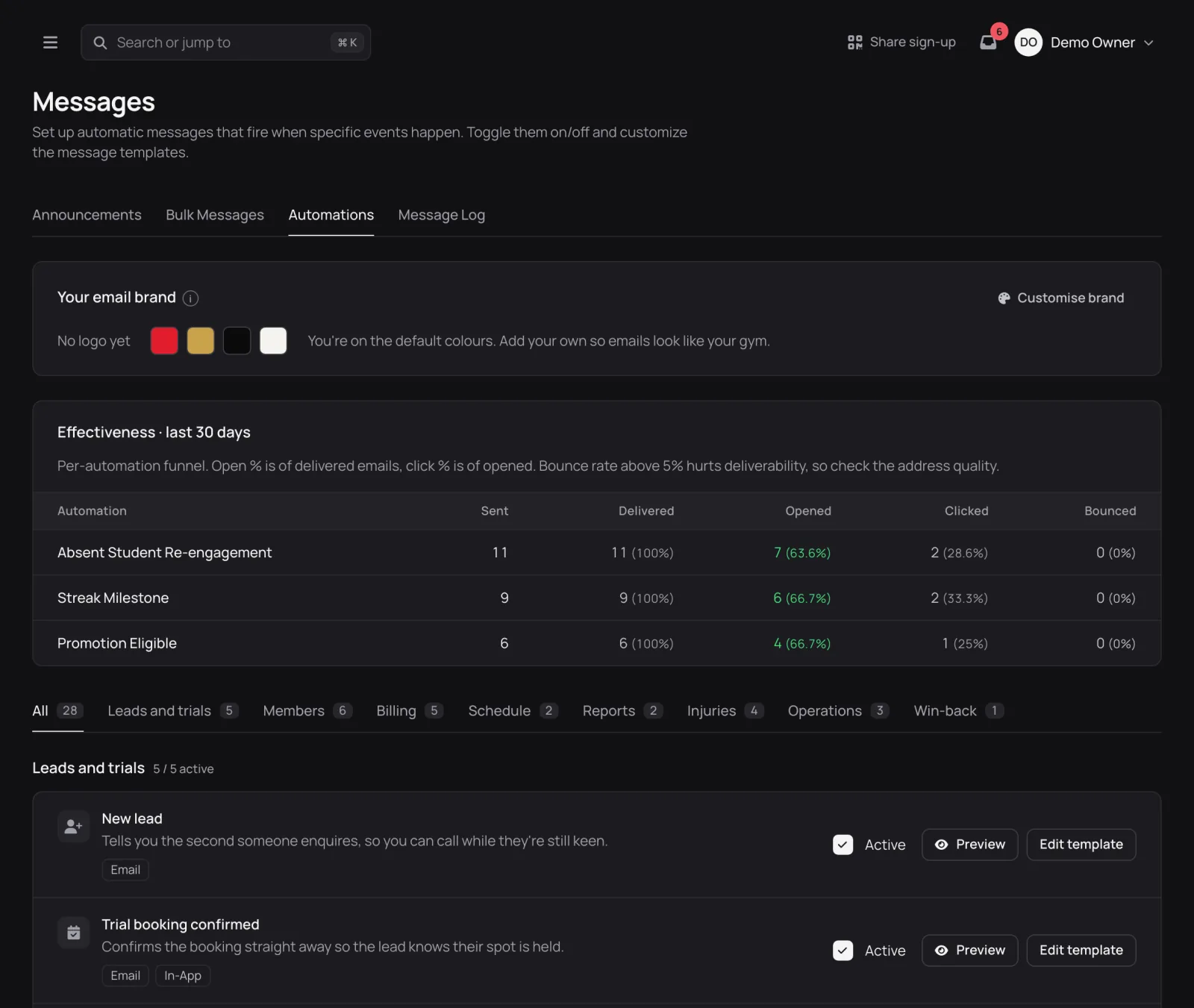
In Combat Control: the trial automations work like this.
- Booking confirmation: sends straight away when someone books through your website booking form, or when you add a lead with a class time.
- Reminder: goes 24 hours before the class by default (you can change the timing), only to confirmed bookings, and once per booking.
- Follow-up: sends four hours after you mark the trial as attended by default. It doesn't send if you have already moved them on, for example by converting them to a member.
- No-show: sends when you move the lead to No-show. Nothing detects a missed trial automatically, so moving the lead is the decision to send.
- New lead: a separate email tells you the second someone books online, so you can ring while they are still keen.
Failed payments: automate the first notice, call before it becomes a chase
A declined direct debit is mostly a timing problem. Most members whose payment fails have every intention of paying, and a prompt, neutral notice with a link to fix it is all they need. The failed payments guide covers the reasons debits fail and how to time retries.
Automate:
- The member notice. Same day, neutral, with a link to update their payment details. No threats, no talk of suspending access.
- An alert to you when a payment has failed more than once, so the repeat failures don't hide in a report.
Call:
- When it fails again. One failure is a bad week. Repeated failures usually mean a closed account, a cancelled authority or a change in someone's circumstances. None of those are fixed by another email. A call that opens with "how are you going?" and offers a pause if things are tight keeps far more people than a third reminder.
Stop condition: once the payment succeeds, the reminders stop. Check that your system won't send another notice after the member has already fixed it.
In Combat Control: the payment automations work like this.
- Notice to the member: an email each time Stripe reports a failed attempt, with a link to update their payment method.
- Alert to you: sends once the payment has failed three times by default. You can change that number.
- Retries: your Stripe account's retry settings decide when Stripe tries again. Combat Control doesn't add retries of its own.
- Resend reminder: past-due memberships have a button for a manual nudge, limited to once every 24 hours.
Members going quiet: let software spot it, let a person reach out
Absence is the clearest early signal that someone is drifting, and it is the easiest one for software to track reliably. Nobody can hold the last check-in date of 150 members in their head. A system can.
What the system shouldn't do is have the whole conversation. The retention curve guide lays out an intervention ladder for this exact moment, and most of its rungs are human: a word from the coach, a personal text, a phone call.
Automate:
- The flag. A list of members who haven't trained in a set number of days, ranked so you know who to contact first.
- One gentle check-in message, if you want one. Keep it about the member, not the gym: "Haven't seen you on the mats for a couple of weeks, hope all's well. Thursday's 6pm is a good one to come back to." No discount, no guilt, no "we miss you!".
Call:
- Anyone with a long-standing habit who has suddenly stopped. A member who trained three times a week for a year and has vanished for three weeks deserves a call, not a template.
- Anyone who has also had a failed payment or asked about cancelling. Two signals together usually mean a decision is being made.
Stop conditions: this is where automated messages most often go wrong. Before you switch on any absence message, check who it will reach. It should not go to:
- members on an approved injury break
- members who have paused for travel or work
- members who have already cancelled
- anyone you have just spoken to
A cheerful "we haven't seen you" email to someone recovering from surgery is the fastest way to turn a loyal member into an ex-member.
In Combat Control: absence is handled in two places.
- Absent re-engagement: messages a member after 14 days without a check-in by default (you can change the number of days).
- It sends once per absence and resets when they next check in.
- It skips people who have never checked in.
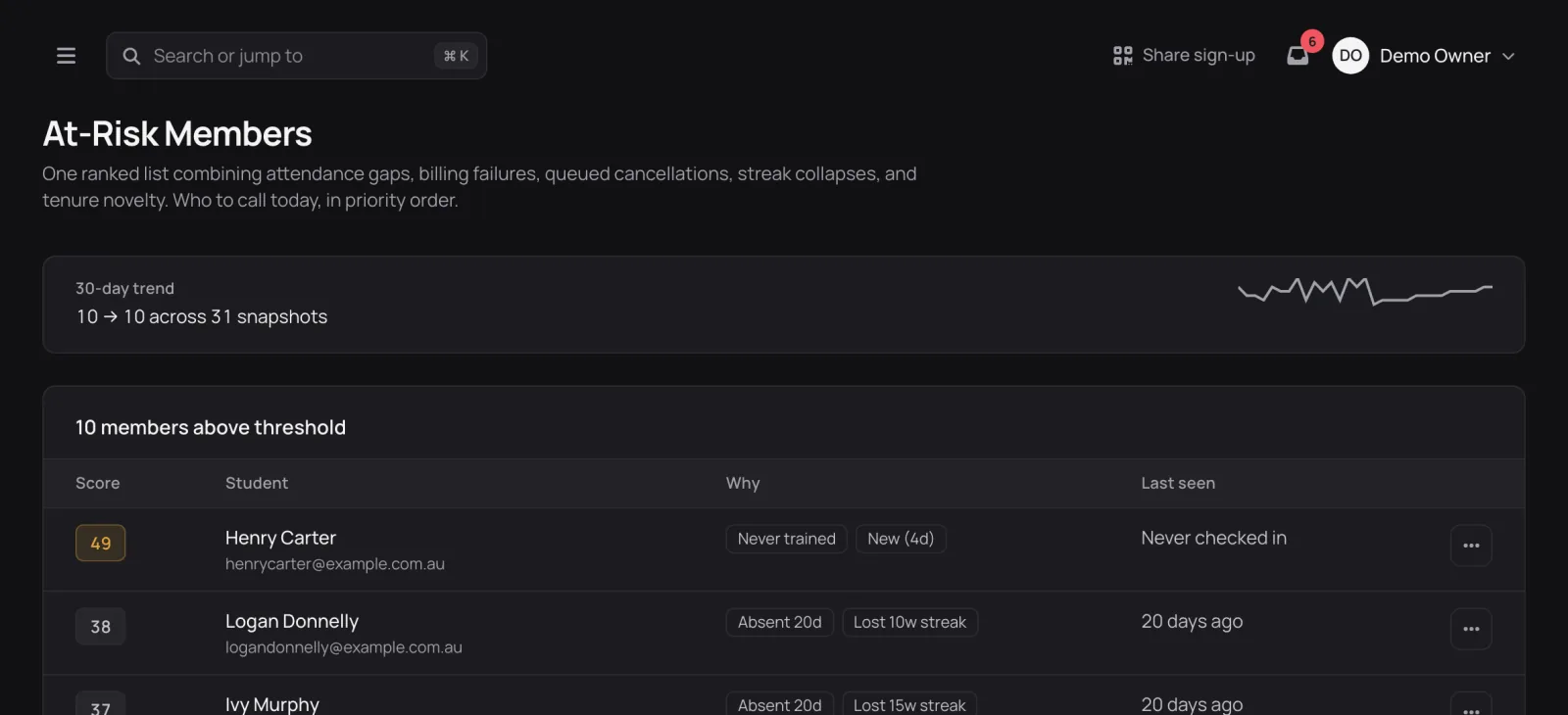
- At-Risk Members page: ranks members by a score built from attendance gaps, failed payments, queued cancellations, broken training streaks and how new they are. Your top five also show on the dashboard.
The At-Risk page is the one to use as a call list.
Cancellations: confirm automatically, save in person
When a member cancels, two things need to happen, and only one of them should be automated.
Automate:
- The confirmation to the member. It should say clearly that the cancellation went through and the exact date their access ends. This is information, it protects you if there is a dispute later, and it should never depend on someone remembering to send it.
- An alert to you, so you hear about the cancellation the day it happens rather than at month end.
Call or talk in person:
- The save conversation. Not a hard sell. Ask what changed. Often the answer is something you can solve: a schedule clash, an injury, a price issue that a pause or a different plan fixes. Sometimes the answer is that they are moving away, and the right response is to thank them and mean it.
Later, automate carefully: a short "door's open" message a month or two after someone leaves can bring people back. It should stop the moment they rejoin, and it should never go to someone you asked to leave.
In Combat Control: cancellations trigger these messages.
- Confirmation to the member: includes the date their access ends.
- Alert to you: the same day the cancellation happens.
- Win-back emails: go 30, 60 and 90 days after the cancellation takes effect by default.
- They skip anyone a manager cancelled.
- They stop for good once the person rejoins.
The trigger, action and stop condition table
Use this as a checklist when you review your own setup, whatever software you run.
| Moment | Automated action | Stop condition | When a person steps in |
|---|---|---|---|
| Trial booked | Confirmation with time, address, what to bring | Booking cancelled | Never needed if the details are right |
| Day before trial | Reminder | Booking no longer confirmed | Never needed |
| After trial class | Short thank-you and next beginner class | They have joined | The conversion ask, from the coach |
| Trial no-show | One friendly reschedule message | They rebook | A personal text or call |
| Payment fails | Neutral notice with a link to fix it | Payment succeeds | After repeated failures |
| Member absent | One gentle check-in, or just the flag | They check in, or are injured, paused or cancelled | Long-standing members, or when combined with another signal |
| Member cancels | Confirmation with end date, alert to you | None, it always sends | The save conversation |
| A month or more after leaving | One "door's open" note | They rejoin, or you asked them to leave | When they reply |
Sample messages that sound like a person
Templates work best when they sound like the coach wrote them on a good day. Three examples you can adapt:
After a trial class
Hi Sam, thanks for coming down tonight. First classes are always a lot, so be gentle with your neck tomorrow. Thursday 6pm is our best class for beginners if you want to come back. Any questions, just reply. See you on the mats.
Failed payment
Hi Alex, your membership payment didn't go through this time. It happens. You can update your details here: [link]. Nothing changes with your training in the meantime. Reply if anything's up.
Member absent
Hey Jordan, haven't seen you on the mats for a couple of weeks. Hope all's well. No pressure, but Saturday's open mat is a good one to ease back in. Let me know if there's anything going on.
Notice what these have in common. No exclamation marks doing the work. No discounts. No "we miss you". Each one gives a concrete next step and an easy way to reply.
A 20-minute weekly call routine
Automation frees up time, and the best use of that time is a short, regular block of personal contact. Something like this, once a week:
- Open your at-risk list or absence report and pick the top five names.
- Check each one's notes first: injury, travel, recent conversation.
- Call, or send a personal text if a call would feel like too much.
- Note what you learned, so the next person who speaks to them knows.
- Check last week's cancellations and failed payments for anyone you haven't spoken to.
Five conversations a week is more than 250 a year. Most of them will be short and friendly, and that is the point: members who hear from a person when things are fine are far more likely to pick up when things aren't.
Getting your automations right
If you run Combat Control's automations, most of them are switched on for a new academy and each can be turned off, reworded or moved between email, in-app and SMS (SMS starts off because it costs money). Spend half an hour going through them with the questions from this guide: does this message inform or decide, what stops it, and who picks up the phone after it.
If you are weighing up software for this, the free trial gives you the full set to try against your own academy's routine.
Frequently Asked Questions
What should a BJJ gym automate first?
Start with the messages that are pure information and time-sensitive: trial booking confirmations, trial reminders and failed-payment notices. They are expected, the same for everyone, and costly to forget.
Should failed payment reminders be automated?
The first notice, yes. It should be neutral and include a link to fix the payment. Repeated failures usually point to a change in the member's circumstances, and those are better handled with a personal call and the offer of a pause.
Are "we miss you" emails a good idea?
Usually not on their own. A single gentle check-in can work if it is about the member and skips anyone injured, paused or cancelled. Members with a long training habit who suddenly stop deserve a personal call instead.
How do I stop automated messages going to the wrong people?
Give every automation a stop condition and check it before switching the automation on. Trial follow-ups stop when someone joins, payment reminders stop when the payment clears, absence messages skip injured, paused and cancelled members, and win-back messages stop when someone rejoins.
Does Combat Control make the phone calls for me?
No. It sends the routine messages, alerts you to new leads, cancellations and repeated payment failures, and ranks members on the At-Risk Members page so you know who to contact. The call itself is yours to make.
Run your academy with Combat Control.
Trials, direct debit, check-in and belts in one place, built only for BJJ. We help you move across from your current system.